
Technical Evangelist // AI Arcanist

One of our dreams for Deep Learning technology, since it really began to blow up in the early 2020s, is real time translation of speech. Inspired by science fiction media like Star Trek, the promise of real-time translation of our speech has always been both exciting and coming with incredible business potential. Just for the sake of efficiency alone, such translation capabilities have the potential to accelerate business interactions to the extreme.
Well, after keeping an eye on the development of TTS, Translation LM, and ASR systems over the years, it is finally possible to make our own real-time speech translation pipeline using open-source technologies! In this tutorial, we will walk through our faster-than-speech translation pipeline created using Python. This tutorial will walk through using the Whisper ASR, Hunyuan MT translation LLM, and Soprano 80M TTS pipelines together, and conclude with a walkthrough of a Gradio application combining the three models into a functional, realtime translated speech pipeline.
Key Takeaways
- End-to-end real-time speech translation is now practical with open source: By combining Whisper Large-v3 for ASR, Hunyuan MT for translation, and Soprano 80M for TTS, it’s possible to build a faster-than-speech pipeline that transcribes, translates, and speaks audio in under a second for several seconds of input on modern GPUs.
- Model efficiency matters as much as accuracy: Whisper’s strong multilingual zero-shot ASR, Hunyuan MT’s high-quality yet scalable translation (from 1.8B to 7B), and Soprano’s ultra-low-latency TTS together show how carefully chosen, efficient models enable real-time performance without proprietary systems.
- Production-ready demos can be built with minimal glue code: A relatively small Python application, wrapped in a Gradio UI, is sufficient to orchestrate ASR → translation → TTS, demonstrating how accessible real-time speech translation has become for developers and businesses alike.
Whisper Large v3
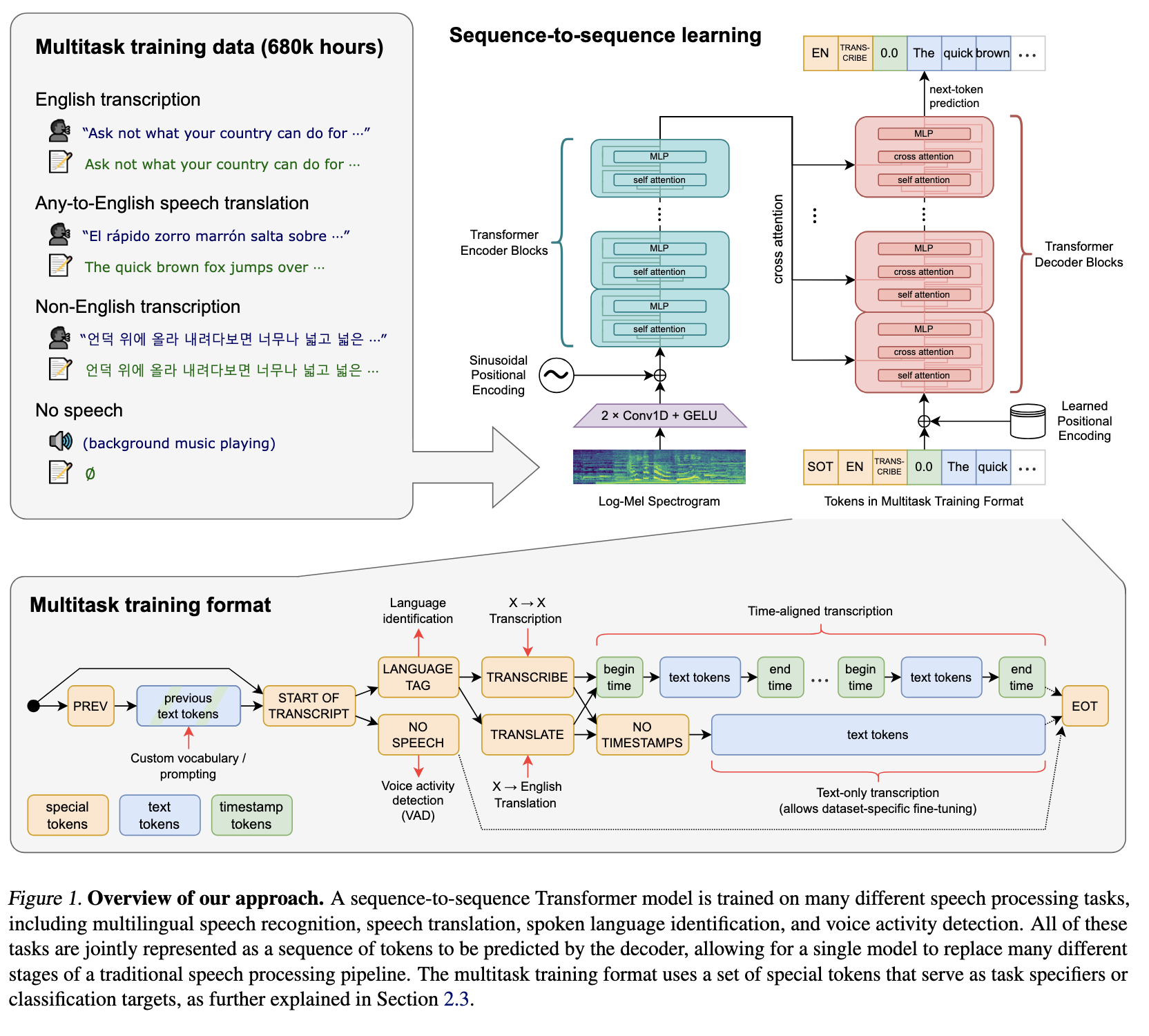
Whisper is a state-of-the-art automatic speech recognition and speech translation model introduced by OpenAI in the paper Robust Speech Recognition via Large-Scale Weak Supervision by Alec Radford et al. Trained on over five million hours of labeled audio, Whisper shows strong zero-shot performance, generalizing effectively across a wide range of datasets, languages, and real-world domains.
Whisper Large-v3 supports over 99 languages and introduces targeted improvements over its predecessor (Whisper Large v2) such as a dedicated Cantonese token and significantly enhanced performance, particularly for English. It offers better handling of accents, background noise, and technical terminology, delivering 10–20% fewer errors than v2 while also providing faster processing across diverse audio conditions and a wide range of languages including Afrikaans, Arabic, Chinese, French, German, Hindi, Japanese, Spanish, and many more (Source).
With Whisper Large v3 as the ASR backbone, we can accurately take in speech from nearly any resource and accurately transcribe it to usable text for the Text To Speech model.
Hunyuan MT
Hunyuan Translation Model version 1.5 consists of two models: the 1.8B-parameter HY-MT1.5-1.8B and the 7B-parameter HY-MT1.5-7B, both designed to support bidirectional translation across 33 languages while incorporating five ethnic and dialect variants. HY-MT1.5-7B builds on Tencent’s WMT25 championship model and is optimized for explanatory translation and mixed-language scenarios, with added capabilities such as terminology control, contextual translation, and formatted output. Despite having less than one-third the parameters of the 7B model, HY-MT1.5-1.8B delivers comparable translation quality with much higher speed, and after quantization can be deployed on edge devices for real-time translation use cases, making it highly versatile and broadly applicable.
For this demo, we are using the full 7B model. This is largely owing to the power of the NVIDIA H200 we are running the model with, but the 1.8B model can easily be substituted using the code segment below.
Soprano 1.1 80m
Finally, we have our TTS model. Soprano is an ultra-lightweight, on-device text-to-speech model built for expressive, high-fidelity speech synthesis at unprecedented speed, delivering up to 2000× real-time generation on GPU and 20× real-time on CPU with lossless streaming and ultra-low latency (<15 ms on GPU, <250 ms on CPU). Its compact 80M-parameter architecture uses under 1 GB of memory while supporting infinite-length generation through automatic text splitting and producing crystal-clear, highly expressive 32 kHz audio.
Demo: Real-time Speech Translation

Now that we have introduced the core components of the pipeline, let’s put it all together. To facilitate this, we have created a Github repo where you may access this project, found here. The ReadMe file outlines how to use the demo. To get started, launch your GPU Droplet using the instructions outlined in this tutorial. This will allow you to access your GPU Droplet from your local machine’s terminal window, and then use the VS Code/Cursor simple browser feature to then access the demo Gradio web app.
Next, paste the following code into your GPU Droplet terminal window:
git clone https://github.com/Jameshskelton/realtime_speech_translation
cd realtime_speech_translation
python3 -m venv venv
source venv/bin/activate
pip3 install -r requirements.txt
python3 realtime_speech_translation.py
This will start up the web application. By default, there will be both a shared link and a local link.
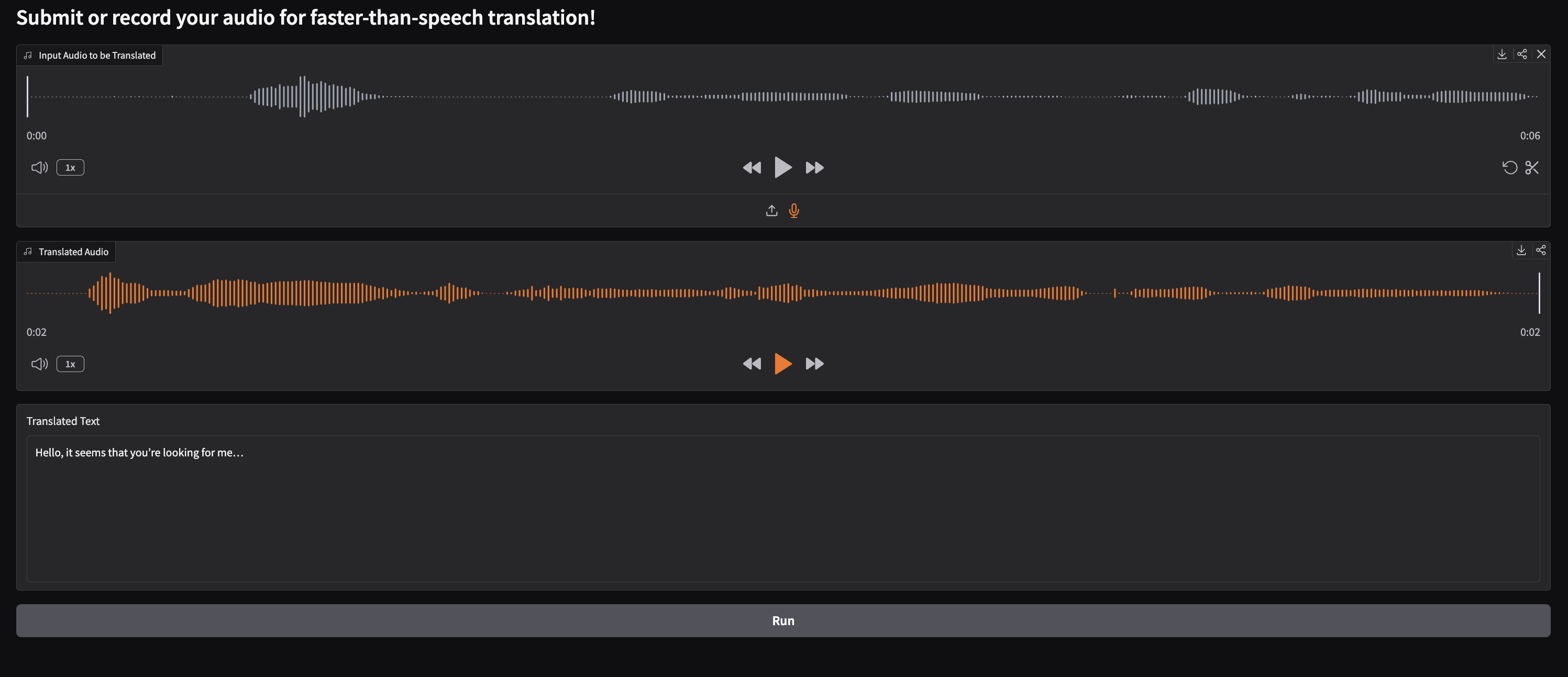
Here is what the demo page will look like. To use it, submit an audio file or recording using the Audio Gradio module. Then click the Run button at the bottom of the application to run translation. Depending on the size of your submission, this could take anywhere from less than a second to a few seconds.
We can see the code for below:
# -----------------------------
# Imports
# -----------------------------

import os
import torch
import numpy as np
import gradio as gr

from transformers import (
    AutoModelForSpeechSeq2Seq,
    AutoProcessor,
    AutoModelForCausalLM,
    AutoTokenizer,
    pipeline,
)

from soprano import SopranoTTS
from scipy.io.wavfile import write
from pydub import AudioSegment


# -----------------------------
# Device and dtype configuration
# -----------------------------

device = "cuda:0" if torch.cuda.is_available() else "cpu"
torch_dtype = torch.float16 if torch.cuda.is_available() else torch.float32


# -----------------------------
# Whisper ASR setup
# -----------------------------

model_id = "openai/whisper-large-v3-turbo"

model = AutoModelForSpeechSeq2Seq.from_pretrained(
    model_id,
    torch_dtype=torch_dtype,
    low_cpu_mem_usage=True,
    use_safetensors=True,
)
model.to(device)

processor = AutoProcessor.from_pretrained(model_id)

pipe = pipeline(
    "automatic-speech-recognition",
    model=model,
    tokenizer=processor.tokenizer,
    feature_extractor=processor.feature_extractor,
    torch_dtype=torch_dtype,
    device=device,
    return_timestamps=True,
    chunk_length_s=5.0,
)


# -----------------------------
# Translation model setup
# -----------------------------

model_name_or_path = "tencent/HY-MT1.5-1.8B"

tokenizer = AutoTokenizer.from_pretrained(model_name_or_path)
model_tr = AutoModelForCausalLM.from_pretrained(
    model_name_or_path,
    device_map="auto",
)


# -----------------------------
# TTS setup
# -----------------------------

model_tts = SopranoTTS()


# -----------------------------
# Audio utilities
# -----------------------------

def convert_to_mono_pydub(input_file, output_file, output_format="wav"):
    """
    Converts a stereo or multi-channel audio file to mono using pydub.
    """
    audio = AudioSegment.from_file(input_file)
    mono_audio = audio.set_channels(1)
    mono_audio.export(output_file, format=output_format)
    print(f"Converted '{input_file}' to mono file '{output_file}'")


# -----------------------------
# ASR → Translation → TTS pipeline
# -----------------------------

def tts_translate(sample_audio):
    output_filename = "out1.wav"

    sample_rate, audio_array = sample_audio
    write(output_filename, sample_rate, audio_array)

    convert_to_mono_pydub("out1.wav", "out1.wav")

    result = pipe("out1.wav")

    messages = [
        {
            "role": "user",
            "content": (
                "Translate the following segment into English, "
                "without additional explanation.\n\n"
                f"{result['text']}"
            ),
        }
    ]

    tokenized_chat = tokenizer.apply_chat_template(
        messages,
        tokenize=True,
        add_generation_prompt=False,
        return_tensors="pt",
    )

    outputs = model_tr.generate(
        tokenized_chat.to(model_tr.device),
        max_new_tokens=2048,
    )

    output_text = tokenizer.decode(outputs[0])

    innie = output_text.split("hy_place▁holder▁no▁8|>")[1]
    clean_text = innie.split("<")[0]

    model_tts.infer(clean_text, "out.wav")

    return "out.wav", clean_text


# -----------------------------
# Gradio UI
# -----------------------------

with gr.Blocks() as demo:
    gr.Markdown("# Submit or record your audio for faster-than-speech translation!")

    with gr.Column():
        inp = gr.Audio(label="Input Audio to be Translated")

    with gr.Column():
        with gr.Row():
            out_audio = gr.Audio(label="Translated Audio")
        with gr.Row():
            out_text = gr.Textbox(label="Translated Text", lines=8)

    btn = gr.Button("Run")
    btn.click(fn=tts_translate, inputs=inp, outputs=[out_audio, out_text])

demo.launch(share = True)
As we can see from above, the application file first loads in our model files. It then uses helper functions with a core orchestration function to transcribe the input audio, translate that text to english, and then use TTS to turn the translated text into English speech! For example, this all happens in less than a second to work on 5 seconds of audio on a DigitalOcean Gradient GPU Droplet powered by an NVIDIA H200.
Closing Thoughts
In this tutorial, we demonstrated that it is now possible to do real-time speech translation with component deep learning models in a pipeline. This breakthrough has big potential for a myriad of different translation use cases, including in business and entertainment. We look forward to seeing ASR, TTS, and LM Translation technologies develop further so that we may improve this pipeline even more. Our next goal is to add voice cloning to the process!
Try this demo on Gradient today!
Thanks for learning with the DigitalOcean Community. Check out our offerings for compute, storage, networking, and managed databases.
About the author
Still looking for an answer?
This textbox defaults to using Markdown to format your answer.
You can type !ref in this text area to quickly search our full set of tutorials, documentation & marketplace offerings and insert the link!
 This work is licensed under a Creative Commons Attribution-NonCommercial- ShareAlike 4.0 International License.
Become a contributor for community
Get paid to write technical tutorials and select a tech-focused charity to receive a matching donation.

DigitalOcean Documentation
Full documentation for every DigitalOcean product.

Resources for startups and SMBs
The Wave has everything you need to know about building a business, from raising funding to marketing your product.
The developer cloud
Scale up as you grow — whether you're running one virtual machine or ten thousand.

Get started for free
Sign up and get $200 in credit for your first 60 days with DigitalOcean.*

*This promotional offer applies to new accounts only.